
HIG is at its first stable engineering release. We installed the latest public version, HIG 1.10.1, and evaluated its archive format, repeat-pack behavior, project snapshots, repository history, Recovery Vault, and MCP integration. We also compared archive sizes against ZIP and tar.gz on a large engineering project, then ran repeated timing checks on a separate small fixture.
The result is encouraging on size and warm local work, with clear boundaries: one HIGV2 output was 5.5% smaller than the ZIP output and 1.0% smaller than tar.gz on the supplied project corpus. On a separate 3.5 MB fixture, the benchmark report’s full HIG CLI wall-time median was 27.5 ms and ZIP’s was 58.1 ms. The test volume was marked ENVIRONMENT_NOT_QUALIFIED, so these timings are observations from one machine rather than a general performance claim.
What HIG is
HIG is a project-aware archiver with a portable .hig format. Its default HIGV2 path combines Zstandard compression with password-based encryption, integrity checks, and path-safety validation. Around the archive format, the CLI adds a project cache and daemon, immutable repository snapshots, and an independent Recovery Vault. A local MCP server exposes those operations to IDE agents through a constrained tool interface.
The repository is public at github.com/Zorker-Tech/Hig. The Rust workspace declares the MIT license; the public release includes the format, CLI, repository, and IDE/MCP implementation. The project notes that private research and paper materials are outside the public release. The v1.10.1 release identifies this version as the stable engineering release; v1.10.0 was the first public release.
Installation and test setup
The machine already had HIG 1.10.1 installed from the official npm package. We checked both the CLI and MCP smoke command; each reported hig 1.10.1, matching the current GitHub release.
npm install --global @zorker/hig@1.10.1
hig --version
hig-mcp-server --smoke
The evaluation ran on macOS 27.2 with an Apple M4, 10 logical CPUs, and 16 GB of memory. The primary corpus contained 26,939 regular files, 5,804 directories, and 598,269,443 bytes of regular-file data (598.27 MB decimal). It also contained 11 symlinks. HIG did not include symlinks in the archive manifest in our round-trip probe, so the reported archive-size comparison covers regular files. We omit the local source path and file names.
For repeated timing, we used a separate 3,500,718-byte fixture with 244 regular files. It included many small text files, code, repeated content, an empty file, and pseudorandom binary data. This makes the latency sample useful for a developer-project shape without implying that it represents the full 598 MB corpus.
Archive size on the full project
The large corpus produced one measured archive for each format. The HIG row below uses HIGV2 with encryption disabled to compare compression output against the unencrypted ZIP and gzip baselines. That mode still computes BLAKE3 integrity checks, but it provides no confidentiality or authenticated encryption. ZIP was generated with the system zip command; tar.gz used gzip -6.
| Format | Archive bytes | Decimal MB | Share of source |
|---|---|---|---|
| HIGV2, no encryption | 349,684,670 | 349.68 MB | 58.45% |
tar.gz (gzip -6) | 353,284,961 | 353.28 MB | 59.05% |
| ZIP | 370,175,303 | 370.18 MB | 61.87% |
On this corpus, the HIGV2 no-encryption archive was 5.54% smaller than ZIP and 1.02% smaller than tar.gz. The default balanced, password-protected HIG output was 349,710,137 bytes, around 25 KB larger than the no-encryption HIG output on this dataset.
These are size results from one output per format. The full-corpus hig bench --compare run did not produce its final report, so we do not have a completed repeated-latency comparison on the 598 MB source. The measurements below come from the separate small-fixture run.
Repeated timing on a small fixture
HIG’s report separates warm CLI timing from full CLI wall time. In its repeated acceptance sample, the full HIG CLI wall-time median was 27.52 ms (p95 52.16 ms); ZIP’s CLI wall-time median was 58.12 ms (p95 89.35 ms). The report also lists a 17.92 ms HIG warm-path median (p95 33.28 ms).
| Report metric | Median | p95 |
|---|---|---|
| HIG warm-path CLI wall time | 17.92 ms | 33.28 ms |
| HIG full CLI wall time | 27.52 ms | 52.16 ms |
| ZIP CLI wall time | 58.12 ms | 89.35 ms |
A separate one-shot row for the same fixture measured the first balanced HIG pack at 285 ms and its cached second pack at 17 ms. ZIP’s one-shot row was 55 ms, and tar.gz’s was 232 ms. These single-run rows are not the same statistic as the repeated medians. The fixture’s default balanced HIG archive was 790,379 bytes on the first pack and 790,377 bytes on the second; ZIP was 856,963 bytes, and tar.gz was 816,336 bytes.
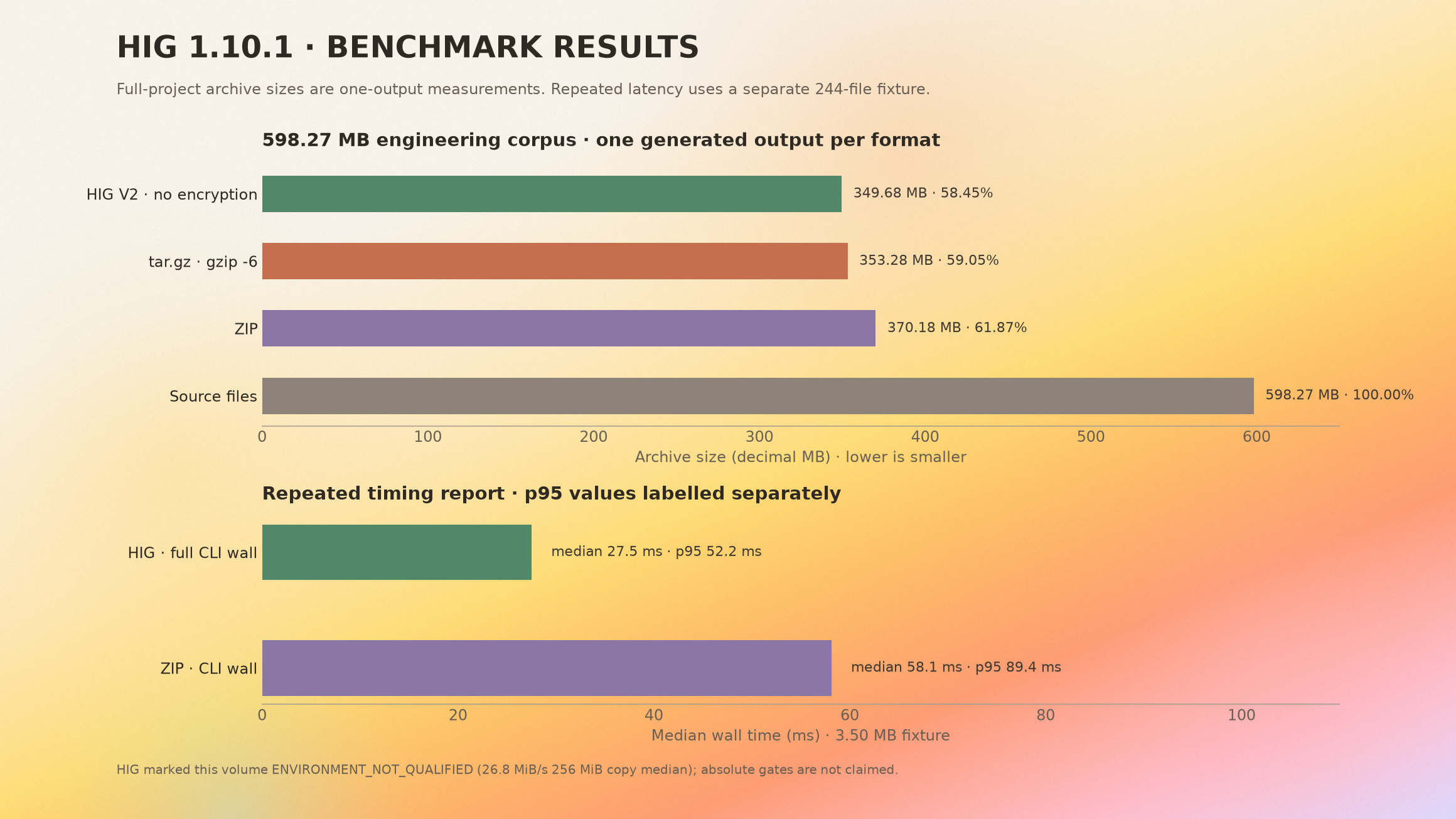
The benchmark copied a 256 MiB qualification file at a median of 26.82 MiB/s on the selected volume. HIG returned ENVIRONMENT_NOT_QUALIFIED and NOT_ABSOLUTE_PASS_ENV_UNQUALIFIED; its relative size and wall-time values are still reported, but the absolute release gate is not claimed. The full workflow took 162.6 seconds, including this storage qualification. That total is not a compression-time measurement.
Compression modes and parameters
The benchmark also compared HIG modes on the small fixture. These rows are one-shot observations, not the repeated medians above.
| HIG mode | Archive bytes | One-shot time | What it exercised |
|---|---|---|---|
| HIGV2 balanced, first pack | 790,379 | 285 ms | Default batch/chunk path, secure password mode |
| HIGV2 balanced, second pack | 790,377 | 17 ms | Reused cache objects while rechecking file hashes |
| HIGV2 with secure session | 790,375 | 22 ms | Reused an in-memory session key; unlock cost was reported separately |
| HIGV2 with warm daemon/session | 790,382 | 5 ms | Warm cache and session path; KDF was skipped for this pack |
| HIGV2 fastest, secure KDF | 790,261 | 15 ms | Explicit fastest path with sealed-block reuse |
| HIGV2 with batching disabled | 824,522 | 19 ms | --no-batch |
| HIGV2 legacy format | 866,100 | 338 ms | HIGV1 compatibility path |
| ZIP | 856,963 | 55 ms | System zip -qr baseline |
| tar.gz | 816,336 | 232 ms | tar plus gzip -6 baseline |
The main CLI controls are:
| Option | Purpose and default |
|---|---|
--format higv2 | Portable HIGV2 archive format; HIGV1 is available for legacy archives and migration. |
--encryption password | Default. Derives a key with Argon2id and protects the manifest and block payloads with ChaCha20-Poly1305. Use --encryption none only when confidentiality and AEAD authentication are not required. |
--compression zstd | Default compression codec; --level selects an explicit level. |
--speed balanced | Default conservative mode. fastest can trust path/size/mtime metadata and reuse locally sealed ciphertext; use it only when that trade-off is acceptable. |
--threads N | Sets the worker count. |
--cache-dir PATH, --no-cache | Select or disable the local cache. |
| `--daemon auto | off |
| `--project auto | off |
| `--memory-mode adaptive | low` |
--no-batch, --no-chunk | Disable small-file batching or large-file chunking for diagnostic comparisons. |
--password-stdin | Read the archive password from standard input rather than putting it in process arguments. |
HIGV2 uses Argon2id, ChaCha20-Poly1305, and BLAKE3 as specified in the public format documentation. HIG’s README explicitly warns that no-encryption mode has no confidentiality or AEAD authentication. The fastest mode also has a documented metadata-trust trade-off; balanced mode is the safer starting point for important archives.
Functional feature review
We tested representative end-to-end flows on small, isolated fixtures so the supplied project stayed unchanged.
| Feature area | What we exercised | Result |
|---|---|---|
| Archive lifecycle | Pack, inspect, unpack, correct and incorrect passwords, and a corrupted payload block | Regular-file round-trip matched; wrong passwords and the modified payload were rejected during extraction. |
| Legacy compatibility | HIGV1 password-protected archive migrated to HIGV2 and unpacked | Migration round-trip matched. HIGV1 correctly refused a no-encryption request. |
| Project workflow | Initialize, inspect status, set policy, rebuild, start/stop watcher, and observe a file change | Commands completed; the watcher observed the edit (event sequence advanced, one dirty file, no overflow) and shut down cleanly. |
| Daemon, session, and cache | Start/status/stop, unlock/status/clear, cache status, GC preview, compaction preview, and task listing | Completed on a dedicated test cache. GC and compaction were run in dry-run mode. |
| Repository history | Two snapshots, refs, branches, tags, diff, path history, storage tree, symbols, symbol history, full/range/symbol restore, verify, and report-only GC | Snapshot and restore checks passed; the repo watcher recorded the edited-file snapshot. |
| Recovery Vault | Initialize, register, capture, audit, verify, pin/unpin, policy, tombstone, scrub, report-only GC, and restore | Local synthetic-vault restore matched the expected file bytes. |
| MCP server | Initialize, list tools, call version, and try a path outside the configured root | Server returned 68 tools; version was 1.10.1; the out-of-root request was denied. |
The archive round-trip deliberately exposed a behavior worth knowing: HIG skipped the symlink in the fixture. If a workflow depends on links, check them separately before replacing a tool that preserves them. We did not extract the full 598 MB output, so the full-project row is a compression-size result, not proof of full-corpus restore fidelity.
The Recovery Vault test used one local test vault. We did not run mirror promotion, mirror repair, or a media-loss drill. HIG’s operator guide says production durability depends on verified recovery points, independently protected mirrors, and separate custody for recovery authentication. A local capture alone is not an off-device backup.
Where HIG fits
Before risky code changes. A project snapshot gives a developer or coding agent a recoverable point before a broad refactor, generated-code update, or dependency migration. Use Git for collaboration and remote history; HIG repository history is its own local recovery layer, not a Git replacement.
Repeated local snapshots. A daemon and project cache can reduce repeated work after the initial pack. The small-fixture run showed a large difference between first and second HIG passes, but this result depends on a warm cache and the local storage path.
Byte-accurate recovery. Repository history supports file, byte-range, and symbol-oriented recovery. That is useful when the desired rollback is one function or range rather than an entire working tree.
IDE agents. The MCP server lets an agent use snapshot and recovery operations through named tools. Keep HIG_MCP_ALLOWED_ROOTS limited to the intended workspace, vault, and restore destinations; the out-of-root test was denied.
Portable encrypted archives. The default password mode is suitable when an archive may leave the machine. Keep the password out of command-line arguments and logs; --password-stdin or an unlocked session avoids repeatedly exposing it in process arguments.
What this evaluation does not show
- The full-corpus comparison generated size artifacts, but its final repeated benchmark report was not produced. Do not read the large-corpus table as a 20-run speed comparison.
- The test volume was not qualified for absolute latency gates, and it was close to full during the run. Results should be repeated on a healthy local SSD before making broad performance claims.
zstdand7zcommand-line tools were unavailable, so tar.zst and 7-Zip comparison rows were skipped.- The v1.10.1 release assets include macOS universal CLI/MCP, Linux, and Windows packages, but no desktop DMG. The installed CLI also rejects the README-documented
hig tuisubcommand as unrecognized. This review covers CLI and MCP workflows, not the interactive TUI or desktop UI. - Symlinks were skipped in the tested archive round-trip. We did not run the full-corpus extraction path or Recovery Vault mirror-failover drill.
Open source and next steps
HIG 1.10.1 is the current stable engineering release, and the source is available at Zorker-Tech/Hig. The repository’s Rust workspace declares MIT; review the exact files and packages you plan to redistribute. The release notes and CLI/MCP guide describe the supported install and operations.
This first stable engineering evaluation supports a narrow conclusion: HIG produced compact output on the supplied project and its local warm path looked promising, while the volume qualification, symlink handling, full-source repeated timing, and mirror recovery remain areas that need explicit validation. The next useful run is a repeated full-corpus comparison on a qualified local SSD, followed by a full extraction-and-hash pass and a separate mirror-loss recovery drill.